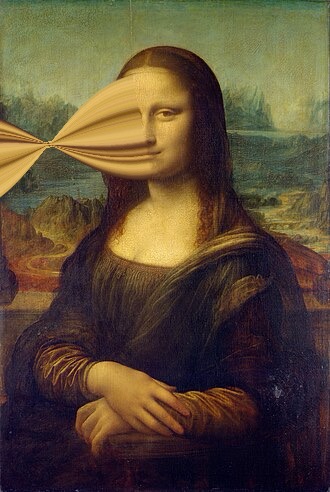
The pixel stretch trend blew up online, but pulling it off used to mean wrestling with Photoshop. Pixel Stretch does it right on your iPhone: tap a photo, draw the band, and export a scroll-stopping video in seconds.
Requires iPhone ยท iOS 17 or later
What it does
A full editor built for one thing โ turning your photos into motion that stops the scroll.
Draw a color band and twist it โ it pinches to a sliver at the waist and flows like real ribbon, not a solid blob.
Line, curve, or freehand. Trace a stroke with your finger and the band follows it across the frame.
Detected people lift off the band automatically, with a soft shadow and glow so they read in front.
Five graded film looks โ Kodachrome, Faded, Polaroid, Noir, Cinema โ with a mix amount, applied to photo and video.
Streaks that radiate from a center point for a hypnotic, zoom-burst energy. The line sets center and radius.
A Photoshop-style draggable grid pushes and pulls the band into shape while your photo stays put.
How it works
No timeline, no learning curve. Import, shape, export.
Pick any shot โ you land straight in the editor, no menus in the way.
Draw the band, twist it, pop the subject, dial in a film look until it feels alive.
Hit Animate, preview the loop, and post straight to TikTok or Instagram.
Built for sharing
Frame your video to the platform before you export โ the preview matches the final clip exactly.
Get the app
Turn the photos already on your phone into motion worth posting.
Coming soon to the App Store